Owner-only operations platform
Kayde's Kreations
Custom bakery work creates dozens of small handoffs between inquiry, quote, schedule, production, ingredients, customer communication, and closeout.
I designed and built a private workspace that keeps the owner's operational truth connected while customers see only their own orders and the approved public gallery.
My role · Product designer and engineer
- •Workflow mapping and product design
- •Owner and customer experience
- •Full-stack Next.js engineering
- •Supabase data, access, storage, and realtime
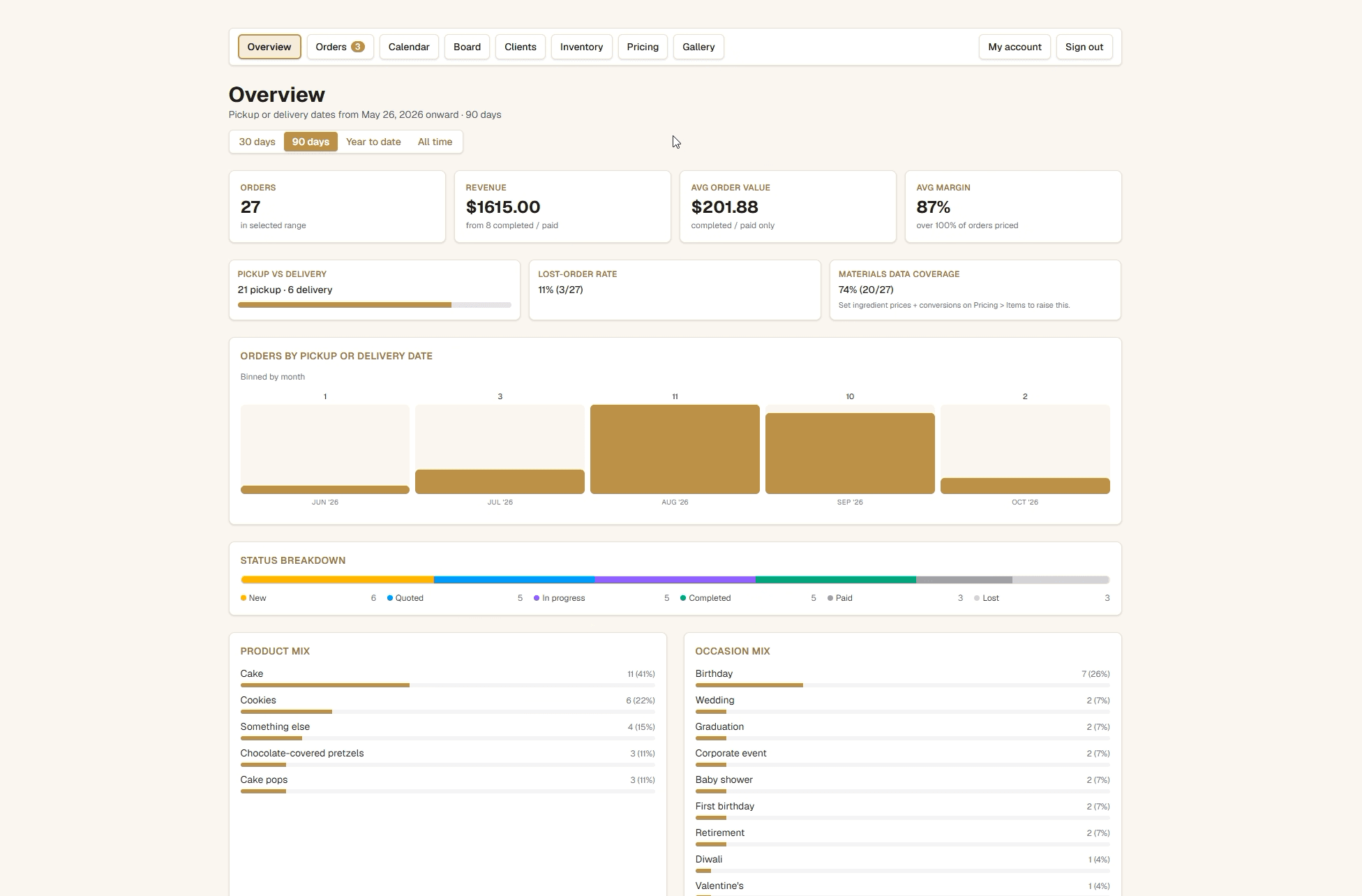
Owner overview
A single operating view for pipeline volume, status, timing, fulfillment mix, and materials coverage. Screenshot uses seeded demo data.
- Owner workspaces
- 8
- Order states
- 6
- Client messaging
- Realtime
- Stock monitoring
- Daily
Overview through gallery
New through lost
Scoped to each order
Reservation-aware review
01 / Order lifecycle
One record, start to finish
The product is organized around the order, not around disconnected tools. Every customer decision and owner action stays attached to the same workflow.
- 01
Capture the request
Customers submit product, occasion, timing, fulfillment, allergies, notes, and reference photos into one order record.
- 02
Quote and sign
The owner builds an itemized quote, publishes a versioned agreement, and receives an electronic signature.
- 03
Schedule the work
Board and calendar views expose status, pickup or delivery timing, production load, and the next action.
- 04
Prepare and communicate
Ingredient planning, progress photos, and realtime customer messages remain attached to the order.
- 05
Record and close
Out-of-band deposits are recorded in a ledger, inventory reservations clear, and completed work can feed the public gallery.
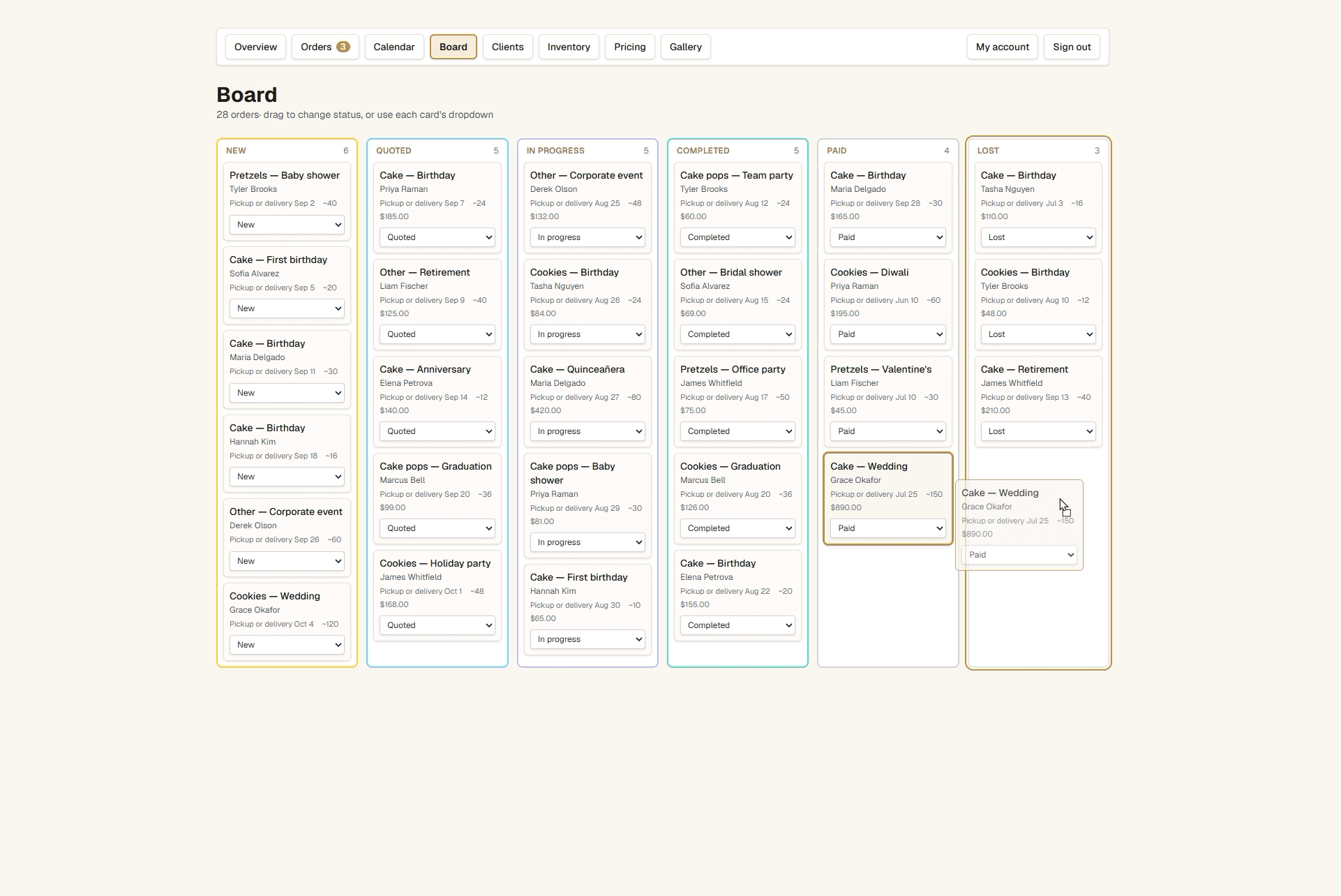
Production board
Drag-and-drop status changes make the active pipeline legible without hiding the same control from keyboard and touch users. Seeded demo orders are shown.
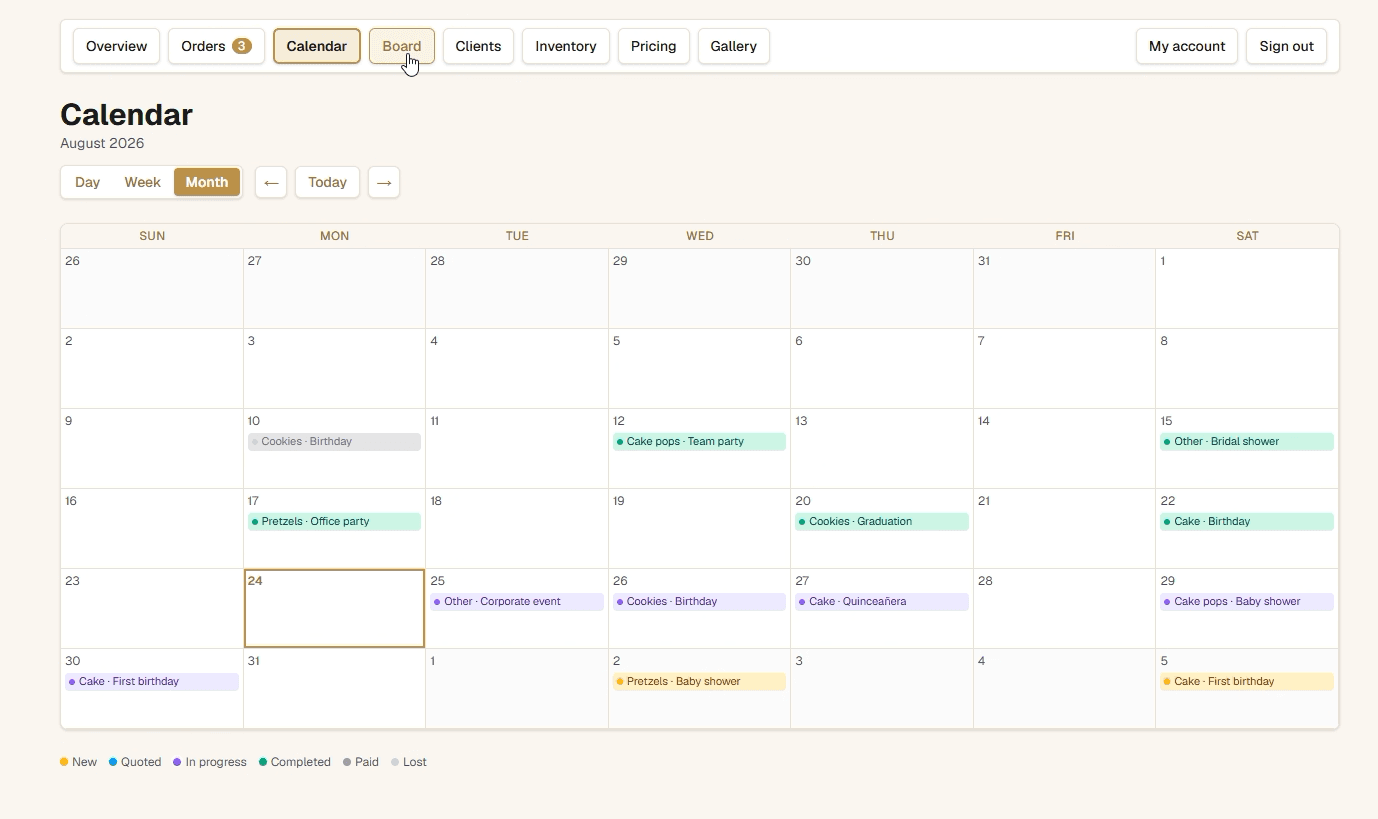
Pickup and delivery calendar
The calendar exposes production commitments by the date the order must leave the kitchen, with day, week, and month views.
Why both views exist
The board answers what state each order is in and what needs attention next.
The calendar answers when the work must be completed and where capacity is tightening.
Both operate on the same status and pickup-or-delivery date instead of requiring duplicate scheduling data.
Human control stays visible
Owners can drag cards, use explicit status controls, or edit the full order without relying on hidden automation.
Customer-visible status labels remain friendlier while the owner keeps the operational detail.
02 / Capacity and cost
Plan from what is actually available
Inventory is not just an on-hand list. Active production reserves ingredients so the owner can see what remains after committed work.
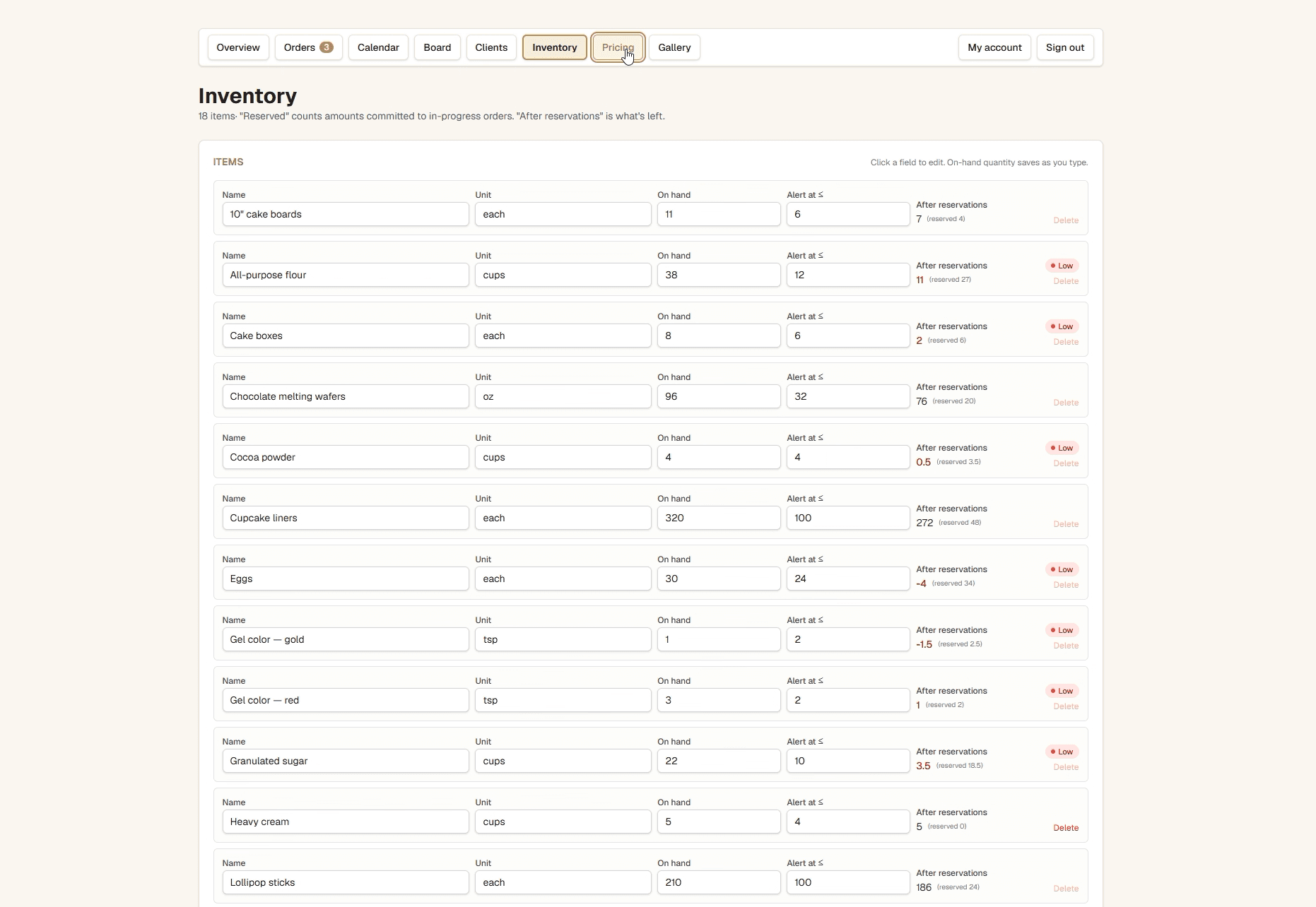
Reservation-aware inventory
Low-stock states use the quantity left after in-progress orders, not the shelf count alone. Screenshot uses seeded demo inventory.
Operational decisions
Ingredient requirements attach to the order and reserve stock when production begins.
Unit conversion connects recipe measures to purchased units without pretending missing price data is complete.
A scheduled review emails low-stock items only when the reservation-aware threshold is crossed.
Margin without false precision
The dashboard calculates material coverage and only reports margin from orders with sufficient pricing data.
Missing conversions remain visible as a coverage gap instead of being replaced with guessed costs.
03 / Public presentation
The owner chooses what ships
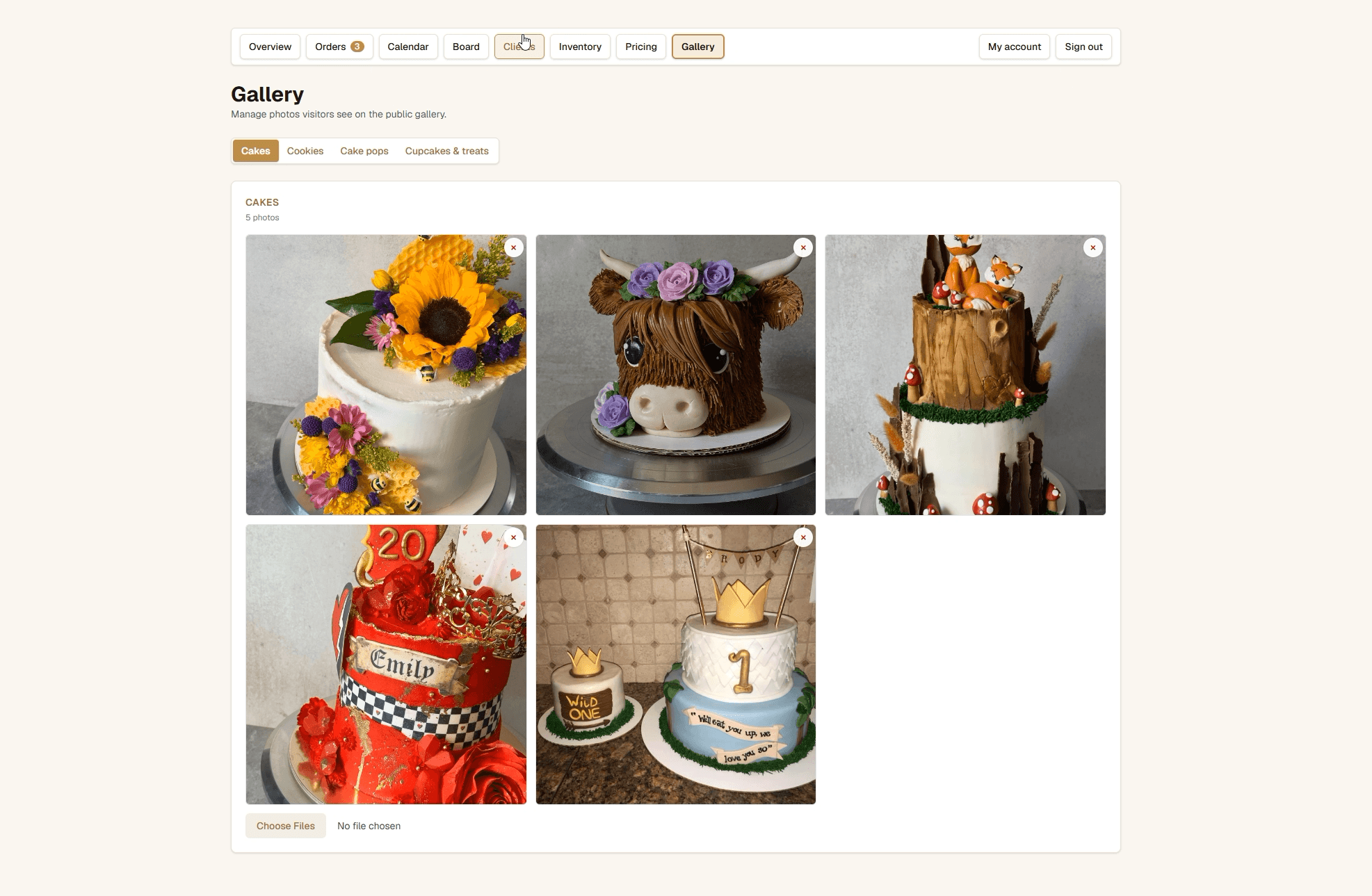
The private workspace controls the public portfolio without exposing the rest of the administrative system or requiring a separate gallery tool.
Gallery management
Approved work can be categorized, added, or removed from the public gallery while order photos remain in private storage.
04 / Architecture and trust
Private by role, connected by order
The product separates customer data, owner-only operations, public gallery media, and privileged money actions while keeping the workflow coherent.
Next.js 16
Server-rendered owner and customer surfaces with focused client components for editing and realtime work.
Supabase Postgres
Orders, quotes, ingredients, inventory, deposits, messages, profiles, and gallery metadata.
Auth, RLS, and Storage
Owner permissions, customer ownership checks, private order photos, and public gallery assets.
Realtime messaging
Per-order customer conversations update without a separate support system.
Code-owned money rules
Server-only operations publish quote versions, record signatures, and append deposit events.
Resend and Vercel Cron
Order and message notifications plus a scheduled low-stock review.
Money boundary
The platform does not process card payments.
Deposits paid elsewhere are recorded as append-only events, preserving an auditable balance without pretending to be a payment processor.
Quote publishing, signature capture, and deposit changes run through server-only operations with role checks.
Current boundaries
The screenshots show seeded demo data, not commercial performance.
Delivery addresses are collected, while distance-based delivery pricing remains a future addition.
The system is private and owner-operated, so this portfolio page is the public product walkthrough.
Continue exploring
Evidence Led Product Work
Return to the portfolio for the LineStriper AI and BidVisory case studies.